
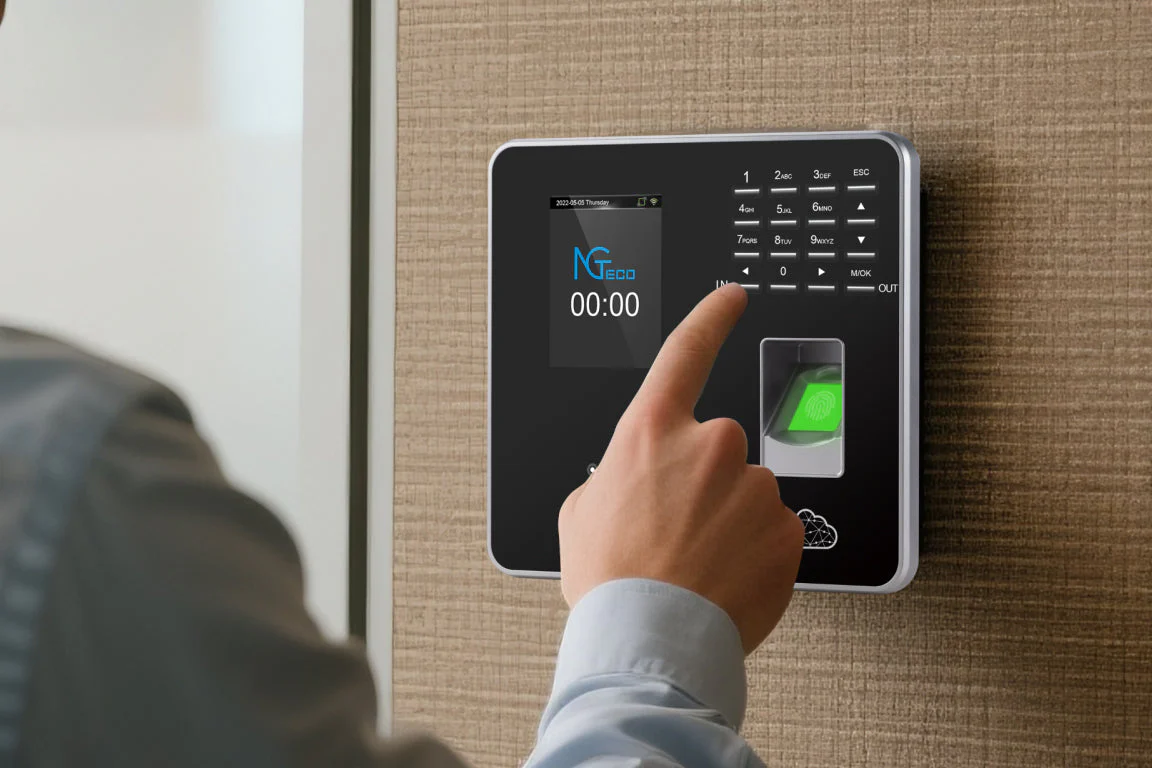
What Is a Biometric Clocking System?
A biometric clocking system for employees is the smarter way to manage time and attendance. Unlike old-fashioned methods such as punch cards, paper registers, or PIN codes, it uses fingerprints or facial recognition to verify each worker. This means no one can cheat the system, and every clock-in or clock-out is 100% accurate. With one simple scan, employees record their time, and managers instantly see attendance data in real time.
What sets this kind of system apart is its ease of use and flexibility. The process is automated from start to finish, allowing any authorised staff member to review, edit, and approve employee times as needed. Whether your team is clocking in at the office, on the shop floor, or at a remote site, the biometric solution streamlines attendance tracking and integrates seamlessly with your existing workflows.
What Is a Time and Attendance Solution?
A time and attendance solution is an automated system designed to take the hassle out of tracking when your employees start and finish their work. Gone are the days of trying to decipher handwriting on paper logs or fumbling with easily forgotten PIN codes. Modern solutions—whether built for bustling offices, busy warehouses, or far-flung remote teams—let you monitor work hours in real time, all with unmatched accuracy.
At its core, a time and attendance system does more than just keep a record of hours:
- It verifies employee identities using methods like fingerprints or facial recognition, ensuring it’s really them clocking in or out.
- It gives managers the tools to review and, if necessary, adjust logged hours within seconds.
- With everything automated and securely stored, payroll becomes a breeze and compliance headaches are minimized.
In short, it’s the fastest route to fair, transparent, and error-free workforce management—no more time theft, manual corrections, or missing attendance sheets.
What Is HR Time and Attendance Software & How Does It Streamline Tracking Work Hours?
HR time and attendance software is a digital tool designed to make recording employee work hours simple and accurate. Instead of juggling paper timesheets or clunky spreadsheets, these solutions—like ADP, Kronos, or BambooHR—automate clock-ins, clock-outs, and manage schedules all in one place. The result? Fewer payroll errors, less manual supervision, and a clear record of when everyone’s on the clock.
But it doesn’t stop there. These platforms often integrate with leave management systems and physical attendance devices (think: biometric scanners or turnstile access points), so managers and HR teams get a full-picture view of working hours, absences, and breaks. Plus, the built-in notification systems keep employees in the loop about their attendance status, making it easier than ever to stay informed and accountable.
Why Integrate Attendance Clocking Systems with HR Software?
Blending your attendance clocking system with your HR software isn’t just a “nice to have”—it’s a practical upgrade that makes everyone’s lives easier (especially if you’re tired of spreadsheets that look like you lost a wrestling match with Excel).
Here’s how the magic happens:
- Up-to-the-Minute Attendance
HR teams get instant visibility into who’s in, who’s on break, and—let’s be honest—who’s perpetually “working from the coffee machine.” Live data means fewer frantic headcounts and more peace of mind. - Stronger Compliance
Every clock-in and out is logged and ready for audit, so when the Department of Labour knocks, you’re not scrambling for paperwork or making excuses about “missing files.” Integration keeps your records airtight and reduces your legal headaches. - Smarter Payroll Processing
Actual hours worked go straight into payroll calculations, slicing out manual data entry (and with it, those mysterious overtime discrepancies). That means faster pay runs and employees who actually trust their pay slips for once.
In short, integrating these systems does for your admin what a really good cup of coffee does for Monday morning: it just makes everything work better.
Types of Biometric Clocking Systems
Biometric clocking systems aren’t one-size-fits-all—there are several models designed to fit different workplace needs. Here are some of the most common options you’ll encounter:
- Fingerprint Scanners: These are the classics, using fingerprint recognition to authenticate each employee. They’re reliable, quick, and ideal for most businesses.
- Facial Recognition Devices: Perfect for contactless check-ins, these scanners verify attendance using facial features. They’re especially handy for workplaces prioritizing hygiene or speed, like healthcare facilities or high-traffic areas.
- Multi-Modal Systems: Some advanced models, such as those from ZKTeco or Suprema, combine fingerprint, facial recognition, palm-vein, or even iris scanning all in one device. This adds extra flexibility and security—use whichever method suits your environment best.
- Mobile Biometric Apps: For teams on the move or remote staff, some solutions let employees clock in using their smartphones, pairing facial or fingerprint scans with GPS tracking to confirm location.
- Access Control Integration: Many biometric terminals double as secure entry systems, managing both attendance and physical access to sensitive areas.
With these options, you can tailor a system that makes attendance tracking effortless—whether you run a small office, a sprawling warehouse, or a multisite operation.
🌓 How Does It Work?
The system requires each employee to be physically present when clocking in or out—no more buddy-punching or forgotten sign-ins. Employees can register multiple fingerprints (even all ten fingers if needed), adding an extra layer of security and eliminating the risk of “ghost” employees. Only after a successful biometric match can a user log in or register their attendance, ensuring that every record truly belongs to the person present.
This seamless approach means HR teams can finally say goodbye to manual errors and questionable timesheets, and instead rely on a robust, tamper-proof record of who is actually in the building, ready to work.
🌓 How Biometric Devices Connect to Your System
Biometric clocking systems communicate with management software through a variety of secure protocols. Common options include TCP/IP for standard network connectivity, USB for direct device-to-PC connections, and sometimes Wi-Fi for wireless setups. Devices from popular brands like ZKTeco or Suprema often support multiple protocols, making integration with your existing systems straightforward.
Because data travels over encrypted channels, you can rest easy knowing personal information stays private and protected. Whether your business prefers a wired network, a direct USB link, or a flexible Wi-Fi solution, biometric devices are designed to fit right in—no complicated setups required.
📌 Why Businesses Need Biometric Clocking Systems
Many companies still use outdated systems that cause mistakes and open the door to time theft. Employees can forget to sign in or even ask colleagues to do it for them. This results in payroll errors, wasted money, and frustrated HR staff. A biometric clocking system removes these risks completely. It ensures that only the actual employee records attendance, giving businesses a reliable record of who is at work and when.
Biometric clocking also helps businesses control labour costs by supporting smarter scheduling. With accurate, real-time data, managers can quickly spot patterns of absenteeism and address them before they become costly problems. By reducing absenteeism and the related expenses, companies not only save money but also boost productivity and morale.
📊 Real-Time Attendance: Streamlining Schedules and Payroll
With real-time attendance tracking, managers always have the latest information at their fingertips. This immediate visibility makes scheduling easier and helps nip absenteeism or lateness in the bud. Need to know who’s actually available for a shift? No more guesswork or hunting down paper timesheets—just open your dashboard for instant answers.
Real-time data also ensures overtime gets calculated fairly and accurately. As soon as someone reaches their regular hours, any extra time is flagged and logged. This means no more disputes over missed overtime or accidental payouts—a win for both employees and finance departments alike.
🔠 Key Benefits of Biometric Systems
✅ Accurate payroll data – No more manual errors or miscalculations.
✅ Payroll integration – Syncs directly with Paymaster Payroll, saving hours of admin.
✅ Cloud-based dashboards – Managers have live access to staff data, anytime, anywhere.
✅ Time savings – HR departments can finally focus on people instead of chasing missing timesheets.
✅ Compliance made simple – Helps businesses meet labor law requirements effortlessly.✅ GPS and mobile clock-ins – Perfect for remote workers, field teams, or off-site staff.
- Live data clocking: Instantly see when and where employees start and finish shifts, whether they’re at the office or out in the field.
- Secure access: Enable fingerprint or facial recognition for added security—no more “buddy punching” or lost PINs.
- Accurate location tracking: The system decrypts GPS coordinates into real addresses, making attendance records crystal clear.
- Task management on the go: Assign and track tasks in real-time, based on where your team is working.
- On-the-job photo capture: Workers can snap photos during site visits or call-outs, providing visual proof of attendance and job progress.
- Works even during load shedding: No power? No problem. Mobile clock-ins stay accessible, so attendance never skips a beat.
🔒 Why Combine Time & Attendance with Access Control?
Integrating your time and attendance software with access control systems brings a new level of security and efficiency to your workplace. By requiring biometric verification—like a fingerprint or facial scan—before letting anyone into secure areas or clocking them in, you ensure that only legitimate employees gain access or record time.
📜 Tracking Access and Generating Reports with Biometrics
A great bonus of biometric clocking systems is their ability to automatically log every entry and exit—right down to the individual and exact time. Whenever someone uses their fingerprint or face to unlock a door or clock in, the system records the event in real time. This means you get a clear, time-stamped trail of who’s accessed which area and when, all without sifting through endless swipe-card logs or sign-in sheets.
These digital records make it simple to generate detailed access reports. Need to check who entered the IT storeroom last Tuesday, or verify attendance for compliance audits? Just a few clicks in your dashboard pulls up all the data you need. This type of precise tracking helps protect sensitive zones, keeps your insurance happy, and arms you with evidence should a security incident ever arise.
By pairing biometric verification with modern reporting tools, your business stays both secure and fully informed—no guesswork required.
🛡️ What Is Software Access Control in Time & Attendance?
Software access control, when used with time and attendance systems, takes workplace security up a notch. Instead of just requiring a password or swipe card, access control systems rely on biometric verification—think fingerprint scans or facial recognition—before granting entry or allowing an employee to clock in. This ensures that only verified, physically-present staff can access the building or restricted areas and record their time.
How does it work? Picture this: when someone arrives for their shift, they place their finger on a biometric reader or look at a camera. The system checks their unique traits against its database—just like turning the key in a lock that only fits you. Only after confirming their identity does the system unlock the door and log their attendance. No shortcuts, no “buddy clock-ins,” and no sneaky workarounds.
By combining software access control from industry leaders like Suprema or HID with your attendance solution, you’re not just tracking hours—you’re protecting your workplace with real, on-the-ground accountability.
Here’s why this matters:
- No more “Ghost Employees”: Biometric access means every entry is tied to a real, present person. This closes the door on phantom workers and fraudulent clock-ins.
- All-in-one convenience: Staff no longer need separate cards or PINs for access and attendance—one quick scan handles both.
- Custom permissions: It’s easy to manage who can enter certain areas at specific times, directly from your management dashboard.
- Audit trails for security: Real-time logs show exactly who entered which area and when, so there’s always a reliable record for compliance or investigation.
- Streamlined onboarding: New hires are added to both attendance tracking and access protocols at once, saving HR time.
With solutions from trusted brands like ZKTeco and Suprema, integrating access control with time tracking keeps your premises—and your payroll—safe, accurate, and hassle-free.
🔠 How Mobile Time and Attendance Apps Work
Modern mobile time and attendance apps make it easy for employees to record their hours whether they’re in the office, on-site, or working remotely. These apps are compatible with both Android and Apple devices, so your team can use their own smartphones or tablets.
With just a tap, staff can clock in or out from any location. For added security and compliance, some apps use geo-fencing—you can set a permitted area where clock-ins are allowed. This means you know employees are exactly where they need to be when starting or ending their shifts. All data syncs instantly to the cloud, giving managers accurate and up-to-date records at a glance.
✅ Time savings – HR departments can finally focus on people instead of chasing missing timesheets.
✅ Compliance made simple – Helps businesses meet labour law requirements effortlessly.
🔐 Security Features in Mobile Attendance Apps
Mobile attendance apps today come packed with security features designed to safeguard your business while keeping things simple for your staff. Forget old-fashioned PINs or vulnerable swipe cards—these apps put advanced verification front and center.
Let’s break down the essentials:
- Biometric Authentication: Industry leading solutions like ZKTeco and Suprema have brought fingerprint and facial recognition right into mobile apps. This ensures that only verified employees can clock in, keeping attendance records airtight against fraud and buddy-punching.
- Real-Time GPS Location: Apps leverage your phone’s built-in GPS, meaning each clock-in captures the precise location and physical address. This supports remote and field teams, assuring managers that everyone is where they need to be.
- Task and Job Tracking: Certain apps allow staff to log specific tasks from their current location. Whether on-site or at a remote job, this detail helps verify not just presence, but productivity too.
- Photo Verification: Some platforms prompt employees to snap a quick photo during clock-in, adding an extra layer of security—especially for field service or call-outs.
- Cloud Sync and Redundancy: Because these systems are cloud-based, everything is backed up and accessible, even during power outages or connectivity hiccups.
By combining these tools, mobile time and attendance apps offer secure, flexible, and reliable solutions for the modern workforce.
How Geo-location and Geo-fencing Keep Your Team On-Site
Modern time and attendance Phone Applications come packed with intuitive features like Geo-location and Geo-fencing, which are especially handy for businesses juggling remote teams or multiple locations.
Here’s how they work their magic:
- Pinpoint Your People: Using a device’s GPS, the system checks the actual location where an employee clocks in. No more guesswork—if Jackie says she’s at the warehouse, the software confirms it.
- Drawing Invisible Boundaries: Geofencing lets you draw a virtual “line in the sand” on a map, such as around your office, cafe, or job site. Employees can only punch in or out when they’re physically inside that digital boundary. Try clocking in from the parking lot across town—the system’s not having it.
These smart features make it easy to ensure hours are recorded where work really happens, whether you’re managing shifts in different cities or just want peace of mind that your crew’s right where they should be.
Remote Clocking In and Out Options
For teams on the move or working outside the office, clocking in and out is easier than ever with today’s tech. Many workforce management solutions now offer remote clocking via smartphone or laptop—no matter where you are. Here’s how you can stay connected and accounted for:
- Mobile Apps with GPS Tracking: Using your smartphone, you can clock in or out from anywhere. Most apps use GPS to verify your location, ensuring accuracy whether you’re in the field, working from a coffee shop, or checking in from home.
- Laptop Check-Ins: Prefer your laptop? Secure web-based platforms allow you to log work hours from any browser. Some systems also prompt for a quick photo or use IP address validation for extra authenticity.
- Real-Time Schedule Access: Beyond just clocking in or out, these systems let you view up-to-date schedules and shift changes right from your device, so you’re always in the loop.
- Self-Service for Leave and Shifts: Requesting time off or swapping a shift is straightforward. Apps allow quick requests on the go, minimizing back-and-forth with managers and speeding up approvals.
With these remote options, managing your time is simple—no matter where the workday takes you.
🔠 Automatic Late Arrival Notifications
Absolutely—modern biometric clocking systems don’t just stop at tracking attendance. Many include automatic notification features that keep everyone on the same page. For example, when an employee is late to clock in, the system can instantly send alerts via SMS, email, or app notification.
This timely nudge helps staff stay accountable and gives managers early warning so they can take action if needed. Whether you’re using a local system or something cloud-based like Time Doctor or Deputy, automatic notifications help everyone keep to schedule and ensure lateness doesn’t go unnoticed.
🔠 Effortless Overtime Calculations
How are overtime calculations handled in the system?
The system tracks every minute an employee works, automatically identifying overtime hours based on your company’s set rules. No manual calculations or guesswork—just clear, precise overtime data ready for payroll each month. This means employees are paid correctly for their extra hours, and payroll errors are a thing of the past. There is an Overtime Module that pulls this all into one place making it easy to track and approve.
Key Features of Automated Time Tracking and Overtime Calculation
When considering automated solutions for managing employee work hours, a few standout features come standard:
- Precise Time Logging: Automated systems capture when staff begin and end their shifts down to the minute—no more deciphering scribbled paper timesheets or trusting everyone’s memory.
- Seamless Overtime Management: Instead of manually tallying extra hours, the software applies your company’s specific overtime rules (or local labor requirements) to calculate who qualifies for premium pay and how much they’re owed. This helps organizations remain compliant, whether they’re handling standard 40-hour workweeks or juggling complex schedules like those at FedEx or Starbucks.
- Reduced Error and Increased Transparency: By removing the guesswork and minimizing manual entry, these tools foster trust across the team—everyone can see their logged hours and anticipated overtime, eliminating surprises at payroll time.
These features combine to save time, ensure accurate compensation, and help businesses steer clear of compliance headaches.
🔠 Accessible Even During Load Shedding
Worried about clocking in when the lights go out? No need. Our biometric clocking system is designed with Africa’s unique challenges in mind, and that includes regular load shedding. Employees can still use their fingerprints or faces to register their attendance, whether or not there’s power at the office. The system stores clock-ins securely and syncs the data once connectivity returns, so you never lose a record.
Plus, essential features like GPS tracking, task management with real-time location updates, and even on-the-job photo capture keep running on mobile devices. Managers and staff can access live attendance and job data remotely using platforms like Android, iOS, or any web browser—flexibility that keeps your workforce moving forward, blackout or not.
In systems like TimeMaster are designed to scale alongside your business. Whether you’re managing a tight-knit team of 10 or a sprawling workforce of 10,000+, there’s no practical cap on the number of users you can enroll. Add new staff as your team expands, and every fingerprint or face scan will be captured and managed with the same accuracy and speed. This flexibility means you never have to hold back on hiring or worry about system capacity again.
🔠 Flexible Shift Rule Settings—Built to Match Your Needs
Managing a diverse workforce means your time and attendance system must be as flexible as your business. TimeMaster’s shift rule settings are designed to handle everything from straightforward day shifts to the most intricate rotating schedules. Whether you run 24/7 operations, have variable start times, or need to accommodate split shifts, the system has you covered.
Here’s what you can expect:
- Custom shift patterns: Build unique schedules for departments, locations, or even individual staff.
- Automated rule enforcement: The software automatically applies overtime, late arrivals, and early departures—no manual double-checking needed.
- Easy adjustments: Need to tweak shifts for a public holiday or a busy period? Updates are instant and reflected everywhere.
- Seamless roster integration: Rosters and shift rules flow straight into payroll, reducing admin and cutting out errors.
With this flexibility, managing even the most complex shift rules is simple and efficient. You stay in control—and your staff always know exactly where they stand.
🔠Supported Biometric Device Brands
Our clocking system is designed for flexibility and integrates smoothly with a wide range of popular third-party biometric devices. Whether your business relies on fingerprint scanners, facial recognition terminals, or multi-modal devices, you’re covered. Compatible brands include:
- ZkTeco
- Suprema
- Hikvision
- Idemia Morpho
This broad compatibility ensures you can choose the hardware that best suits your operations—without being locked into a specific make or model. If you already have existing biometric devices from these brands, our software can connect with them, making setup seamless and transition hassle-free.
🔠How Biometric Devices Connect to Your System
Biometric clocking systems communicate with management software through a variety of secure protocols. Common options include TCP/IP for standard network connectivity, USB for direct device-to-PC connections, and sometimes Wi-Fi for wireless setups. Devices from popular brands like ZKTeco or Suprema often support multiple protocols, making integration with your existing systems straightforward.
Because data travels over encrypted channels, you can rest easy knowing personal information stays private and protected. Whether your business prefers a wired network, a direct USB link, or a flexible Wi-Fi solution, biometric devices are designed to fit right in—no complicated setups required.
🔠No Employee headcount Limits?
No worries about outgrowing your setup—biometric clocking systems like TimeMaster are designed to scale alongside your business. Whether you’re managing a tight-knit team of 10 or a sprawling workforce of 10,000+, there’s no practical cap on the number of users you can enroll. Add new staff as your team expands, and every fingerprint or face scan will be captured and managed with the same accuracy and speed. This flexibility means you never have to hold back on hiring or worry about system capacity again.
🌓Why Choose TimeMaster
TimeMaster’s biometric clocking system is built for African businesses that want accuracy, compliance, and automation. From call centres to factories, retail shops, and construction sites, our solution is flexible, reliable, and secure. With built-in rostering and seamless payroll integration, you no longer need to juggle between spreadsheets and separate systems. Everything works in one place—making workforce management easy and stress-free.
With built-in rostering and seamless payroll integration, you no longer need to juggle between spreadsheets and separate systems. Everything works in one place—making workforce management easy and stress-free.
Plus, TimeMaster doesn’t stop at just clocking in and out. You can enhance your operations further with additional tools like Employee Self-Service (ESS) software and comprehensive Human Capital Management solutions. This means staff can check schedules, request leave, and update their own details, all while HR oversees the bigger picture in real time. The result? A streamlined, flexible system that grows with your business and keeps your entire team connected.
🌓 Conclusion
In today’s workplace, a biometric clocking system for employees is not just a modern tool, it’s a necessity. It stops time theft, ensures fair payroll, and gives managers clear visibility. If your business is still using outdated methods, now is the time to switch to TimeMaster and experience the difference.
📌 Watch how it works here: TimeMaster Video
📧 glen@timemaster.co.za
🌐 www.timemaster.co.za
📞 083 679 1311
🔗 Resources used
📌 Paymaster Payroll
📌 LinkedIn – Paymaster
📌 HRMaster
📌 Time and Attendance Benefits
📌 Cloud Payroll Integration
📌 Easy Staff Rostering


